Night Photos From a Plane Window With Your Phone
Press your phone flat to the glass to kill reflections, turn off the reading light, switch on Night mode, and lock focus on a distant light before you shoot.
Table of contents
A good night shot from a plane depends less on the camera than on the glass in front of it. Press your phone flat against the window to block the cabin's reflection, turn off your reading light, switch on Night mode, and lock focus on a far-off point of light before you tap the shutter. That sequence fixes most of what goes wrong. This guide is for phone cameras on an ordinary passenger flight, not manual settings on a dedicated camera, and it assumes a window seat set back from the wing. Apple's iPhone camera guide explains how Night mode behaves; the rest is handling reflections and vibration.
Why do airplane windows ruin night photos?
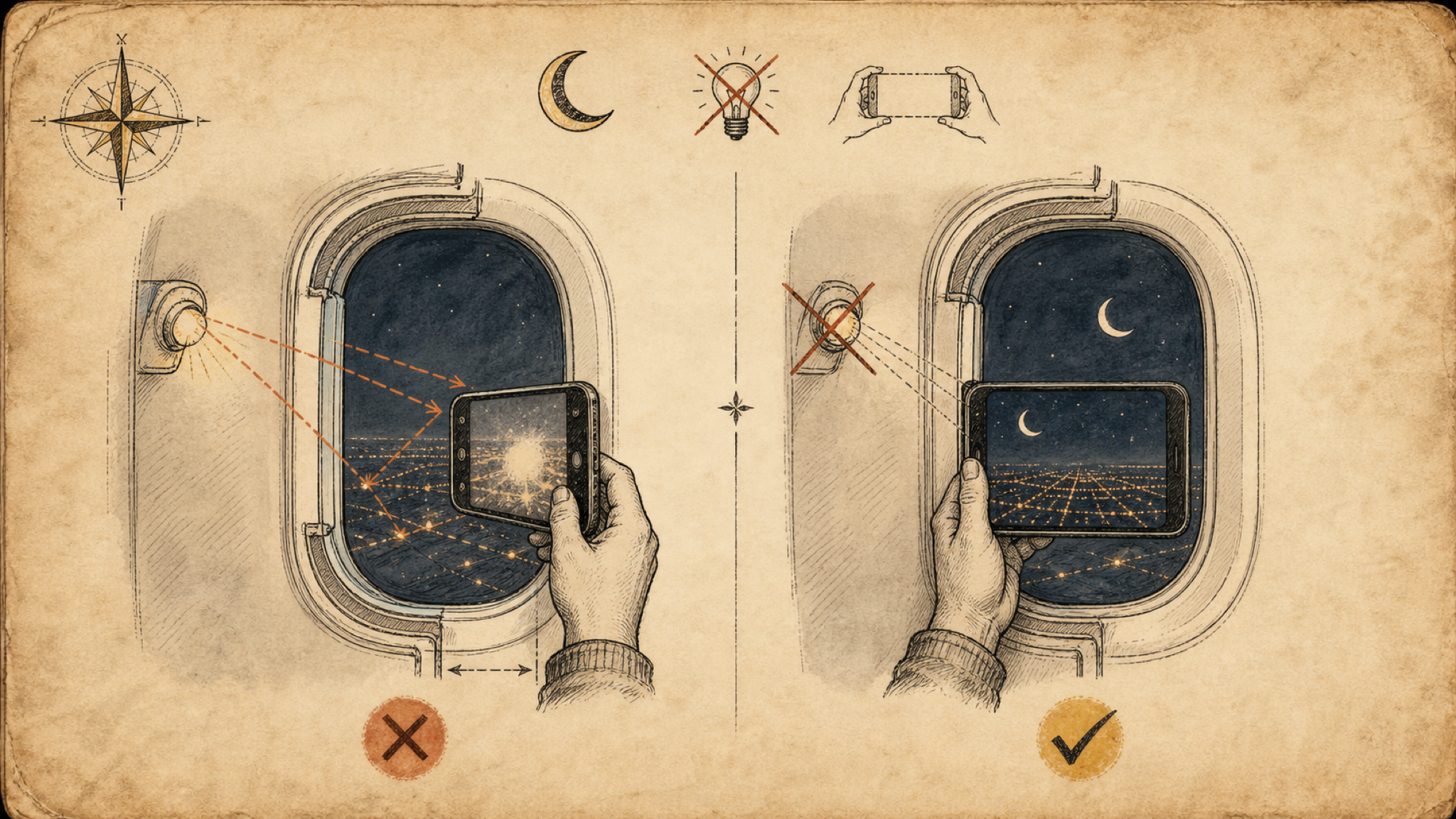
The problem is reflection, not darkness. A lit cabin turns the window into a mirror, so the camera records the seat lights and your own face instead of the city below. Deal with the light on your side of the glass first: switch off the overhead reading light, dim or turn off your seatback screen, and shade the window from any neighbor's light. Fstoppers, a photography education site, notes that your torso is the largest reflective surface next to the glass, so dark clothing (a black jacket, or a dark scarf pulled over your chest) genuinely helps. Passenger windows are acrylic, usually two or three panes thick and often scratched, so find the cleanest patch and shoot straight through it rather than at an angle.
Get your phone's settings right
Turn the flash off first so it cannot fire against the glass and wash out the frame. On an iPhone, Night mode switches on by itself in low light. Apple's iPhone support guide states that Night mode is available on iPhone 11 and later and shows a moon-shaped icon with a number, which is the capture time in seconds. Tap that icon and drag the slider toward Max for the brightest result. Then lock focus: press and hold on a bright, distant light until AE/AF LOCK appears, so the camera stops refocusing on scratches in the window. Most recent Android phones have an equivalent Night or Night Sight mode and a long-press to lock focus. Skip digital zoom on any phone, since pinching past the lens's real range only enlarges pixels and adds grain. Frame wide and crop later.
How do you keep the shot from blurring?
Hold the phone flat and stay still, because Night mode is not a single quick snap. It keeps the shutter open for a second or longer, and any wobble drags the city lights into streaks. Pressing the phone flush against the window does two jobs at once: it seals out the last of the cabin reflection, and it steadies the phone so your hands are not the only support. There is a small trade-off. Leaning hard on the pane sends engine and airframe vibration into the picture, so rest the phone against the glass lightly rather than pressing your full weight in, and hold your breath while the capture runs. When the plane is banking, or you are low over a bright city on approach, a shorter capture time often looks sharper than the maximum.